Pokémon card scanner: exact set, value range, and condition from one photo
CardLens is a Pokémon card scanner app for iPhone. It reads the set symbol and collector number, tells holo from reverse holo, matches Japanese and English printings, and returns a value range built on recent eBay sales plus a condition grade. Then it saves the card to your collection.
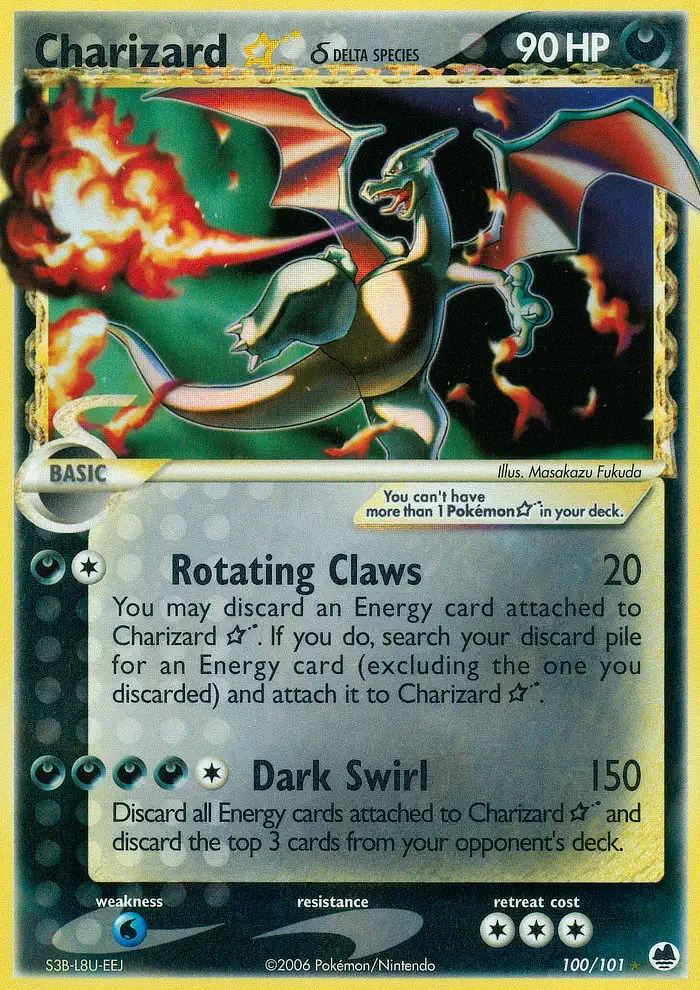
EX Dragon Frontiers · 100/101 · Gold Star · English
Value
$2,400–$5,000
Condition
Near Mint
SetDragon Frontiers
Number100/101
RarityGold Star
Sample result. Values move with the market; the app shows the current range when you scan.
What one scan returns
What the Pokémon card scanner returns: set, value, and condition
A card name is not enough. Charizard has had well over a hundred English printings since 1999, and the set, the number, and the finish are what separate a five-dollar card from a five-figure one. CardLens keeps the three answers apart so you can see where the value comes from.
01
The exact printing
Set name, collector number such as 100/101, rarity symbol, and finish: non-holo, holo, reverse holo, or a promo stamp. If the card is Japanese, the match says so, because a Japanese Pikachu and its English counterpart rarely sell for the same price.
02
A value range with evidence
The range comes from what copies of this printing have been selling for on eBay, and the sales sit one tap below the number, so a Base Set Charizard is never priced off a Celebrations reprint.
03
A condition grade
A condition estimate for raw cards on the Near Mint to Damaged scale, and a read of the label on PSA, CGC, and BGS slabs, so a graded card is matched as a graded card.
How a Pokémon card gets identified
What the scanner reads on the card, and why each detail moves the price
Every Pokémon card carries its own identification, printed small along the bottom edge. Collectors learn to read it by eye. The scanner reads it from the photo.
Set symbol and collector number
On a modern card the collector number sits bottom-left, written as the card's position over the set size: 100/101 for the Gold Star Charizard in EX Dragon Frontiers, a secret-numbered card that sits past the set's official count of 101. Next to it is the set symbol, a small icon unique to each expansion. Together those two facts name one printing and no other.
Cards since Sword & Shield carry a regulation mark, a single letter in a box that says which rotation the card belongs to, and Scarlet & Violet added a three-letter set code beside it. CardLens reads all of it, then confirms the match against the artwork, which is how two cards with the same number in different languages are told apart.
Holo, reverse holo, and the rarity symbol
The small shape beside the number tells you the printed rarity: a circle for common, a diamond for uncommon, a star for rare. Scarlet & Violet expanded the ladder with Double Rare, Ultra Rare, Illustration Rare, Special Illustration Rare, and Hyper Rare, each with its own star marks. The finish is a separate question. A reverse holo has the foil pattern on everything except the artwork; a holo has it on the artwork alone.
The same card number can exist as a non-holo, a reverse holo, and a holo, and in older sets the price gap between them can be large. So the scanner reports the finish next to the number rather than folding it into the name.
Vintage cards carry their own tells. Base Set has no set symbol at all, which is itself the identifier. A 1st Edition stamp sits at the lower-left corner of the artwork on the earliest print run. Shadowless cards lack the drop shadow on the right edge of the art frame, and the 1999-2000 copyright line marks the last unlimited print.
These are the differences a beginner misses and a buyer checks first. The scanner catalogs them as distinct printings, so a shadowless Charizard is never valued as an unlimited one.
Japanese cards use their own numbering, including promo numbers like 227/S-P for the Pikachu from the 2021 Pokémon Stamp Box, a card that was never printed in English. The catalog holds Japanese printings for Pokémon alongside English ones, and the match names the language, because collectors who buy from Japan price the two markets separately.
Black-star promos, McDonald's cards, Prerelease stamps, and Pokémon Center exclusives all get their own entry. If a card exists only as a promo, the match says which promo.
In the catalog
From Wizards-era holos to Japanese promos
A few of the printings the scanner tells apart.
Charizard ★ δEX Dragon Frontiers · 100/101 · Gold Star
PikachuPokémon Stamp Box promo · 227/S-P · Japanese
Mewtwo ★Gift Box Mew & Lucario · 002/002 · Japanese
How it works
Scan a Pokémon card in three steps
1
Photograph the card
Lay the card on a plain surface in even light with the whole card in frame. For holos, tilt a few degrees until the glare slides off the artwork.
2
Check the number
The set, collector number, rarity, finish, and language appear together. Compare the number on screen with the corner of the card; that takes a second and settles the printing.
3
Read the value, then save it
See the value range and the eBay sales behind it, plus the condition grade. Save the card to your vault and your collection total updates.
Get the most from every scan
Three habits of collectors who scan fast and sell well
Shoot in even light, tilt for holos
A flat card on a plain surface in daylight or under a lamp gives the cleanest match. For holos and reverse holos, a slight tilt moves the glare off the artwork and lets the scanner read the finish.
Read the number, then trust the range
The collector number on screen should match the corner of the card. Once it does, the value range and the eBay sales behind it belong to your exact printing, and the number you see is the number that matters.
Save everything, refresh before you sell
Saved cards keep their match and grade, and CardLens refreshes the market evidence when you reopen one. A card you scanned in spring shows current sales when you list it in autumn.
Questions
Pokémon card scanner questions, answered
Is there an app to scan Pokémon cards and see their value?
CardLens is an iPhone app that scans a Pokémon card from a photo, identifies the exact printing, and shows a value range built on recent eBay sales. It also estimates the card's condition and saves it to a collection.
Is there a free Pokémon card scanner app for iPhone?
CardLens is a free Pokémon card scanner app for iPhone, iOS 17 or later. An optional premium subscription adds more to the app; the App Store listing shows the current terms.
Is there a Pokémon card identifier app that works from a photo?
CardLens works as a Pokémon card identifier: photograph the card and it returns the set, collector number, rarity symbol, finish, and language, then shows a value range from recent eBay sales of that printing.
Does it work with Japanese Pokémon cards?
Japanese printings are in the catalog with their own numbering, and the match names the language, so a Japanese card is not priced as the English print.
Can you scan graded Pokémon cards in PSA, CGC, or BGS slabs?
CardLens reads the label on the slab, records the grade with the match, and shows the sales behind the range, so a PSA 10 is treated as a PSA 10 rather than a raw card.
What is the best free Pokémon card scanner app?
The best Pokémon card scanner is the one that matches the exact printing rather than the name and shows the sales behind its price. CardLens reads set, number, rarity, finish, and language from a photo, ties every value range to recent eBay sales of that printing, and is free on the App Store.
Is there an Android version?
Not yet. CardLens is an iPhone app for iOS 17 and later.
Free on the App Store
Scan your first Pokémon card.
Free on the App Store. English and Japanese Pokémon cards from Base Set to the current Mega Evolution expansions, with the finish and the language in every match.

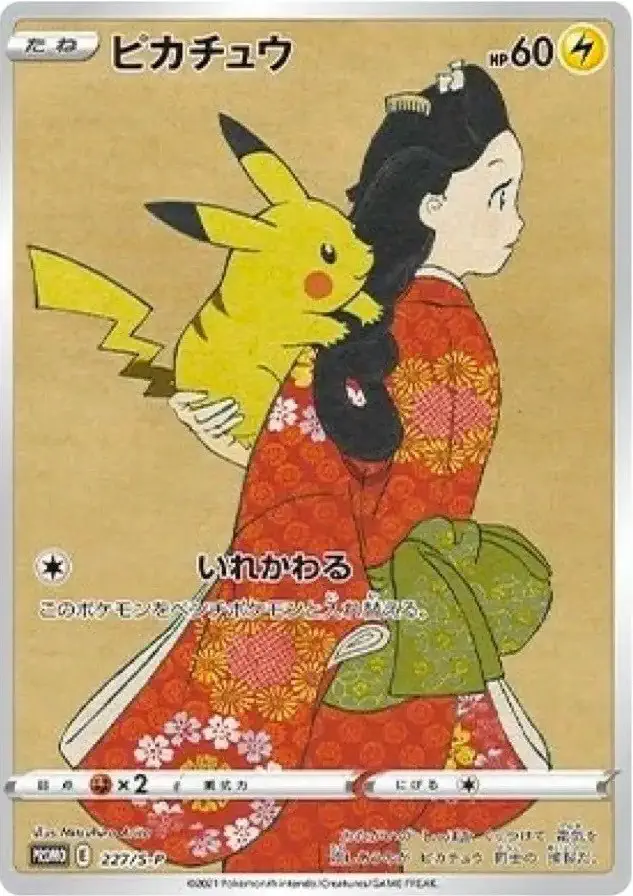 Pikachu
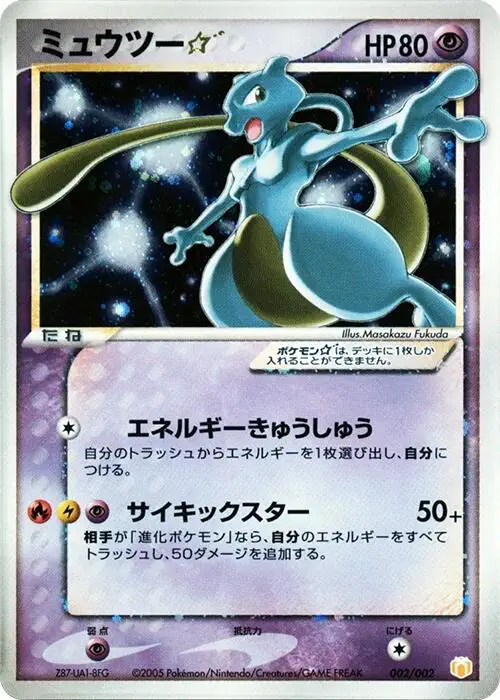 Mewtwo ★