
Condition and grading

Card grading app: a condition grade from one photo, before you pay PSA

CardLens is a card grading app for iPhone that estimates the condition of a raw card from a photo, on the same Near Mint to Damaged scale the singles market uses, and reads the label on cards already in PSA, BGS, or CGC slabs. It works as a Pokémon card grading app first and covers Magic, Yu-Gi-Oh!, One Piece, and Lorcana the same way.

  • Near Mint to Damaged
  • Reads PSA, BGS, and CGC labels
  • Pokémon, MTG, Yu-Gi-Oh!, One Piece, Lorcana
  • Value range next to the grade
Sample scanCondition read
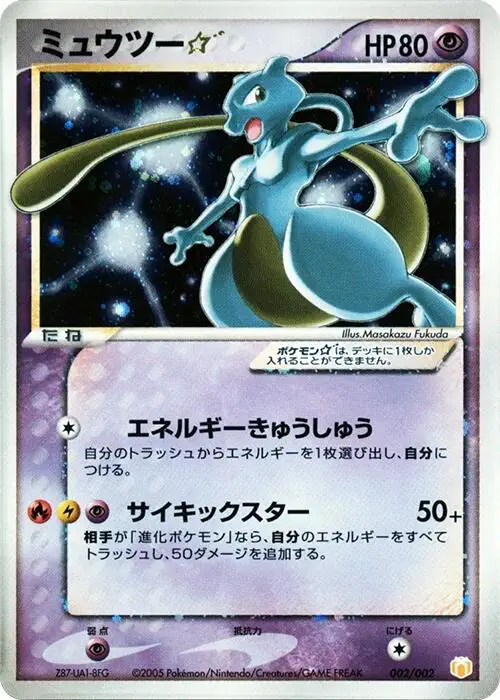
Mewtwo Gold Star from the Japanese Gift Box Mew and Lucario, card 002/002
Condition estimate

Mewtwo ★

Gift Box Mew & Lucario · 002/002 · Japanese

Value range
$700–1,800
Condition
Near Mint
SurfaceClean
EdgesClean
SlabRaw

Sample result. Values move with the market; the app shows the current range when you scan.

What one scan returns

A card condition checker, a value, and a match, together

A condition grade next to the exact printing and its recent sales becomes a decision: keep it raw, send it in, or sell it as is. CardLens puts the three on one screen.

A raw condition estimate

Near Mint, Lightly Played, Moderately Played, Heavily Played, or Damaged, estimated from what is visible in the photo: surface scratches, edge wear, and corner softness, the wear a buyer checks first. The same scale TCGplayer and most stores price in.

A read of the slab label

For a card already graded, CardLens reads the PSA, BGS, or CGC label, records the grade with the match, and shows the sales behind the range so you can see how copies at that grade are trading.

The value at that condition

An estimate anchored to recent eBay sales, shown as a range with the sales behind it. Seeing what raw copies and graded copies of the same card have sold for is the fastest way to judge whether grading pays.

What the grade means

Condition, explained the way buyers use it

Two scales exist side by side. Stores and marketplaces price raw cards on a five-step condition scale; grading companies score slabs on a ten-point scale. Knowing how they relate is most of what you need.

Near Mint to Damaged

Near Mint is a card with at most a tiny flaw: a faint edge nick, a hint of whitening on the back. Lightly Played has visible but minor wear, the kind that shows when you tilt the card under a lamp. Most singles trade at one of those two grades, and the price step between them is where most of the money is. That step is what the estimate is built to get right.

PSA, BGS, and CGC grades

PSA grades from 1 to 10, with half grades up to 8.5 and no 9.5; 10 is Gem Mint. BGS uses half points and four sub-grades, with a 10 Pristine above 9.5 Gem Mint. CGC also grades in half points up to 10. A raw Near Mint card is a candidate for a high grade; the grader's call on centering and surface under magnification decides the number. When a card is already in a slab, the grade on the label is the fact that matters, and the scanner records it.

When grading pays

Grading pays when the gap between a raw sale and a graded sale is larger than the fee plus shipping. That is true for vintage holos, popular alternate arts, Enchanteds, and prize cards, and it is the arithmetic every experienced collector runs before a submission. Scan the raw card, look at how graded copies have been trading, and you have both sides of the decision in one app.

A Near Mint estimate on a card whose graded sales run well above raw is the signal to send it in; check the centering yourself before you ship. Everything else stays raw, sells fine, and keeps the grading budget for the winners.

How to photograph a card for the best estimate

A front-facing photo in even light shows surface scratches, print lines, and corner and edge wear, and those drive the estimate. Lay the card flat on a plain surface, keep every edge in frame, and move any glare off the surface by tilting the card a few degrees. Foils reward a second shot from a slightly different angle.

Then turn the card over and look at the back edges under the same light. With the front estimate and a look at the back, you have covered what a grader checks first.

How it works

Get a condition grade in three steps

  1. Photograph the card

    Flat, on a plain surface, in even light with no glare on the surface. Keep the whole card in frame so the edges and corners are visible.

  2. Read the grade and the match

    The condition estimate appears with the exact printing. For a slab, the grade on the label is read and recorded with the match.

  3. Look at raw and graded sales

    Open the value range to see recent eBay sales for the printing, then decide whether the card is worth sending in. Save it to your vault either way.

Before you submit

Three habits that turn a condition estimate into a good decision

  • Even light, no glare, every edge in frame

    Surface scratches, print lines, and corner and edge wear all show in a flat, evenly lit photo. That is what the estimate reads, so a clean photo gives a confident grade.

  • Flip it before you submit

    The scan grades the front. Turn the card over and check the back edges under the same light, and you have covered what a grader will look at first.

  • Run the arithmetic on the sales

    Look at what raw and graded copies of the printing have sold for. When the graded price clears the fee and shipping with room to spare, that is your candidate for the next submission.

Questions

Card grading app questions, answered

Is there a free card grading app?

CardLens is free to download on the App Store and estimates a card's condition from a photo. An optional premium subscription adds more to the app; the App Store listing shows the current terms.

Is AI card grading accurate?

On a clear, evenly lit photo the estimate is built to catch the step that moves the price most, Near Mint to Lightly Played. Pair it with a look at the back of the card and you have what you need to decide whether to submit.

Can I use it as a PSA pre-grading app?

That is its main job. CardLens gives a condition estimate on the Near Mint to Damaged scale and shows what raw and graded copies of the printing have sold for, so you can pre-grade a card at home and decide whether a PSA, BGS, or CGC submission is worth the fee.

Can I scan graded cards in PSA, BGS, or CGC slabs?

The scanner reads the slab label, records the grade with the match, and shows the sales behind the range.

Is my card worth grading?

Compare recent raw sales and graded sales for the same printing. When the graded price clears the fee and shipping with room to spare, and the estimate reads Near Mint, it is a strong candidate. Vintage holos, popular alternate arts, and Enchanteds are where that happens most.

Which games does the card grading app cover?

It works as a Pokémon card grading app first, and covers Magic: The Gathering, Yu-Gi-Oh!, One Piece Card Game, and Disney Lorcana the same way: a raw condition estimate for all five, and slab label reading for all of them.

How do I photograph a card for the best grade estimate?

Lay it flat on a plain surface, use even light with no glare, and keep every edge in frame. For foils, tilt the card slightly to move reflections off the surface. Blurry or dark photos produce cautious estimates.

Free on the App Store

Know the condition before you pay to grade.

Free on the App Store. A condition grade, the exact printing, and recent sales for raw and graded copies, from one photo.

Download CardLens